Basket (0)
Close

Refurbished Cisco Switches: UK Buyer’s Guide to 9200 & 9300
- September 24, 2026
Cisco kit is the backbone of countless UK business networks, but new list prices and long lead times can make a straightforward switch refresh feel painful. That is why more IT teams are turning to refurbished Cisco switches. Bought well, they deliver the same performance and reliability as new, for a fraction of the cost.
This guide walks you through the popular Catalyst ranges, explains the licensing you need to understand, and shows you how to buy refurbished with confidence. If you are weighing up a Catalyst 9200 or 9300, or wondering what to do about an ageing 2960-X, this is for you.
Why UK Businesses Buy Refurbished Cisco Switches
The appeal is simple. A refurbished, fully tested Catalyst switch often costs far less than the same model new, while doing exactly the same job. For businesses watching budgets, that gap is hard to ignore.
There are a few reasons this market has grown:
- New prices keep rising, so the saving on refurbished has widened.
- Lead times on new kit can be long, while refurbished stock is ready to ship.
- Proven, stable models are often preferred over the very latest release for core network roles.
- Sustainability goals are easier to meet when you keep good hardware in service.
It is worth knowing that Cisco itself recognises the value in used equipment. When a product line reaches end of sale, Cisco points customers towards its own Certified Refurbished Equipment programme, as it does in the official Cisco end-of-sale and end-of-life notices. Refurbished Cisco is a normal, sensible part of the market, not a workaround.
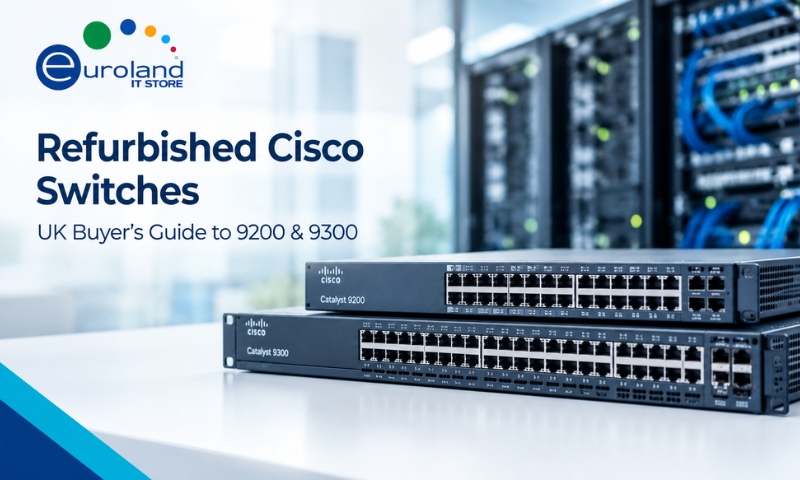
Catalyst 9200 vs 9300: Which Do You Need
The Catalyst 9000 family is Cisco’s current generation of access switches, and the 9200 and 9300 are the two you will meet most often. They look similar but suit different jobs.
The Catalyst 9200 series
The 9200 is built for the access layer in small and mid-sized networks. It handles the everyday task of connecting desktops, phones, access points and cameras, with the reliability you expect from Cisco. For most branch offices and standard office floors, a 9200 is plenty.
The Catalyst 9300 series
The 9300 is a stackable, feature-rich switch aimed at larger or more demanding environments. It offers higher performance, more uplink options, greater stacking bandwidth and richer features. If you need a robust distribution layer, high user density or advanced capabilities, the 9300 is the stronger choice.
Here is a quick comparison to help you choose.
| Feature | Catalyst 9200 | Catalyst 9300 |
|---|---|---|
| Best role | Access layer, branch and office | Access and distribution, larger sites |
| Performance | Solid for standard needs | Higher throughput and capacity |
| Stacking | Basic stacking | High-bandwidth stacking |
| Uplinks | Fixed or modular options | More flexible, higher-speed uplinks |
| Typical buyer | Small to mid business | Mid to large business |
If you are unsure, a simple rule works well. Choose the 9200 for straightforward office access, and the 9300 where you need more power, resilience or features. You can browse both across our range of Cisco switches.
What About the Older 2960-X
Plenty of UK networks still run the trusty Catalyst 2960-X, and it remains a capable access switch. It is worth knowing where it stands, though.
Cisco announced the end of sale for the 2960-X family, with the last order date passing in 2022, as set out in the official 2960-X end-of-life notice. End of sale does not mean the switch stops working. It simply means Cisco no longer sells it new and is winding down support over time.
For many businesses, a well-priced refurbished 2960-X is still a practical choice for simple access roles, particularly where you want to match existing kit or keep spares on the shelf. If you are planning further ahead, moving to a 9200 gives you a current-generation platform with a longer support runway. Both paths are valid. It comes down to your budget and how long you need the switch to serve.
Are Refurbished Cisco Switches Reliable
This is the question that stops many buyers, and the honest answer is that quality depends almost entirely on who you buy from.
A reputable supplier will:
- Test every switch thoroughly before it is sold.
- Reset units to factory defaults and clear old configurations.
- Update firmware where appropriate.
- Grade the hardware so you know its cosmetic condition.
- Include a warranty for genuine peace of mind.
Cisco enterprise switches are built to run for many years in demanding environments, so a properly refurbished unit has plenty of working life left. The reliability risk comes not from the idea of refurbished, but from buying untested kit off an anonymous marketplace. Buy from a specialist, and that risk all but disappears.
Understanding Cisco Switch Licensing
This is the part that catches people out, so it is worth getting right. Modern Catalyst 9000 switches use software licences that sit alongside the hardware.
In simple terms:
- The hardware runs Cisco’s IOS XE software.
- Features are unlocked by a licence tier, commonly Network Essentials or the fuller Network Advantage.
- Cisco’s management and automation features may use a separate DNA subscription.
When you buy a refurbished switch, always check what licensing is included and what your network needs. A good supplier will be clear about the licence level on the unit. For most standard access roles, Network Essentials covers the job. If you rely on advanced automation and management, confirm you have the right entitlement. Getting this clear before you buy avoids surprises later.
How to Buy Refurbished Cisco With Confidence
Follow these steps and you will get quality kit that works first time.
- Confirm the exact model and part number. Cisco naming is precise, so match the switch to your needs down to the port count and power option.
- Check the condition grade. A clear grade tells you the cosmetic state. Performance is the same, so choose the grade that fits your budget.
- Ask about testing. Every unit should be tested and reset to factory defaults before sale.
- Clarify licensing. Know which licence tier is included and whether it suits your network.
- Confirm the warranty. Always buy with a warranty from a supplier who stands behind the kit.
- Buy from a specialist with stock. A dedicated IT hardware supplier understands Cisco far better than a general reseller, and real stock means fast delivery.
PoE, Uplinks and Stacking: Get the Spec Right
Two switches with the same model name can still differ in ways that matter. Before you buy, check these three things so the switch fits your real needs.
- Power over Ethernet. If you run IP phones, wireless access points or cameras, you need PoE to power them down the network cable. Check the switch supports PoE or the higher-power PoE+ or PoE++, and that its total power budget covers all your devices at once.
- Uplinks. Uplinks connect the switch to the rest of your network. Decide whether you need copper or fibre uplinks, and at what speed, then make sure your chosen model has the right ports.
- Stacking. Stacking lets several switches act and be managed as one, which simplifies larger deployments. If you plan to grow, choose models that stack and buy the correct stacking cables.
Getting these right at the buying stage avoids the classic mistake of ordering a switch that fits the desk but not the job. If you are unsure which variant you need, give your supplier the details of your devices and network, and they will point you to the correct model.
Do Not Forget Transceivers and Cables
A switch rarely arrives ready to run on its own. To connect it to the rest of your network, you will usually need optics and cabling.
- Transceivers carry fibre and long-distance links. Match the right SFP or SFP+ module to your switch and your fibre. Browse compatible transceivers to complete the link.
- Uplink and stacking cables connect switches together. Make sure you have the correct leads for your chosen models.
- Wider networking parts such as power supplies and modules may be needed for a full deployment. Explore the full networking parts range to fill any gaps.
Buying the switch and its optics together from one supplier saves time and avoids compatibility headaches. You can also shop the full Cisco range in one place.
Final Thoughts
Refurbished Cisco switches let you build a reliable, capable network for far less than buying new, and with none of the long lead times. The key is to buy the right model for the role, understand the licensing, and choose a specialist supplier who tests their kit and stands behind it with a warranty.
Get those basics right, and refurbished Cisco is one of the smartest networking decisions a UK business can make.
Planning a network refresh? Explore our range of Cisco switches and networking hardware, or contact the Euroland IT Store team for advice on the right model, licensing and matching transceivers.
Frequently Asked Questions
Q: Are refurbished Cisco switches reliable?
A: Yes, when bought from a proper supplier that tests every unit, resets it to factory defaults and provides a warranty. Cisco enterprise switches are built to last for years.
Q: Should I choose a Catalyst 9200 or 9300?
A: Choose the 9200 for standard office and branch access, and the 9300 where you need higher performance, greater capacity, richer features or a strong distribution layer.
Q: Is the older 2960-X still worth buying?
A: For simple access roles and matching existing kit, a well-priced refurbished 2960-X can still make sense. If you want a longer support runway, a 9200 is the current-generation choice.
Q: Do refurbished Cisco switches come with a licence?
A: They should come with a stated licence tier, commonly Network Essentials or Network Advantage. Always confirm the licence level and check it suits your network before buying.
Q: Will I need transceivers with my switch?
A: Usually yes, for fibre and uplink connections. Match the correct SFP or SFP+ modules to your switch and fibre, and buy them alongside the switch to avoid compatibility issues.