Basket (0)
Close

Barcode Scanner Types: 1D vs 2D, Wired vs Wireless
- October 21, 2026
A barcode scanner might seem like a simple piece of equipment, but choosing the wrong type can slow down everyday business operations. A scanner that works perfectly at a supermarket checkout may not be suitable for a busy warehouse, delivery service or manufacturing facility.
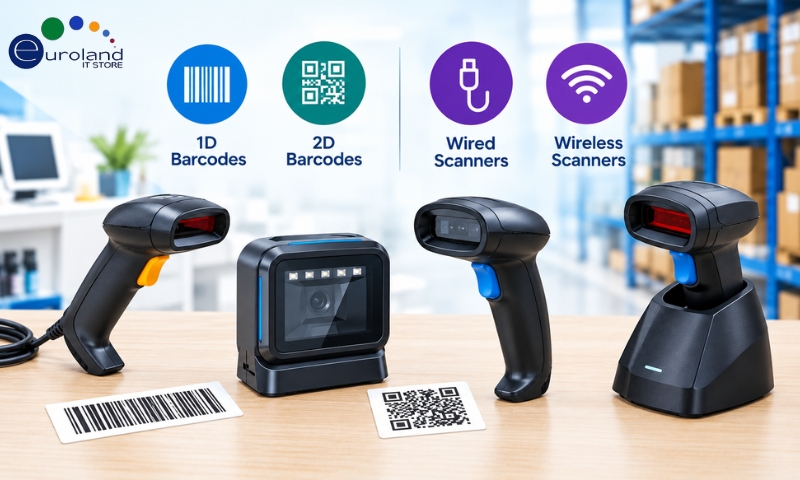
Today, businesses can choose from several types of barcode scanners, including 1D, 2D, wired and wireless models. Each is designed for different working environments and scanning requirements.
For example, a small retail shop may only need a basic wired scanner to read product barcodes. A warehouse handling hundreds of packages every day might benefit from a wireless 2D scanner that allows employees to move freely between storage areas.
Understanding these differences can help businesses avoid unnecessary costs and select equipment that supports their daily operations.
Why Does the Type of Barcode Scanner Matter?
Barcode scanners help businesses identify products, track stock, process transactions and manage information accurately.
However, not every scanner can read every barcode or operate effectively in every environment.
Some scanners are designed to read traditional product barcodes, while others can capture QR codes and more complex barcode formats. Certain models require a physical connection to a computer, while others transmit scanned information wirelessly.
The right choice depends on three important questions:
- What type of barcode does your business need to scan?
- Where will employees use the scanner?
- Does the scanner need to remain connected to a computer or move around the workplace?
Answering these questions first makes it easier to narrow down the available options.
Understanding 1D and 2D Barcode Scanners
The main difference between 1D and 2D barcode scanners is the type of barcode information they can capture.
Although both technologies are used for product identification and tracking, they work with different barcode formats.
What Is a 1D Barcode Scanner?
A 1D barcode scanner reads traditional linear barcodes made up of vertical lines and spaces.
These barcodes are commonly found on retail products, shipping labels, books and inventory items.
Common 1D barcode formats include EAN-13, UPC-A, Code 39 and Code 128.
1D scanners are widely used because they are simple, reliable and often affordable.
A basic 1D scanner can be suitable for businesses that only need to capture product numbers or inventory identifiers.
For example, a small shop using EAN barcodes for checkout transactions may not require the additional capabilities of a 2D scanner.
However, a 1D-only scanner cannot read QR codes or other two-dimensional barcode formats.
What Is a 2D Barcode Scanner?
A 2D barcode scanner can read two-dimensional barcode formats that store information both horizontally and vertically.
Unlike traditional linear barcodes, 2D codes can contain more information within a relatively small space.
Popular 2D formats include QR Code, Data Matrix, PDF417 and Aztec Code.
Most modern 2D imaging scanners can also read standard 1D barcodes, making them suitable for businesses that handle multiple barcode formats.
For example, a healthcare organisation may use Data Matrix codes for product identification, while a logistics company may scan both traditional shipping labels and 2D codes.
2D scanners are also useful for reading barcodes displayed on mobile phone screens, such as digital tickets and electronic vouchers.
However, this capability depends on the scanner’s imaging technology and supported barcode formats.
1D vs 2D Barcode Scanners: Which One Do You Need?
The choice between 1D and 2D scanning depends on the type of information your business needs to capture.
| Business Requirement | 1D Scanner | 2D Scanner |
|---|---|---|
| Standard retail product barcodes | Yes | Yes, on most models |
| QR code scanning | No | Yes |
| Data Matrix codes | No | Yes, if supported |
| Mobile screen barcodes | Limited, model-dependent | Commonly supported |
| Basic inventory tracking | Suitable | Suitable |
| Multiple barcode formats | Limited to supported 1D formats | Wider format support |
| Initial purchase cost | Often lower | Often higher |
| Future flexibility | More limited | Generally greater |
For businesses that only use traditional product barcodes, a 1D scanner may be sufficient.
However, if your organisation expects to introduce QR codes, digital tickets or advanced product tracking, investing in a 2D scanner may offer better long-term flexibility.
Wired vs Wireless Barcode Scanners: What Changes?
Once you have decided between 1D and 2D scanning, the next question is how the scanner should connect to your system.
This is where wired and wireless barcode scanners differ.
A wired scanner uses a physical cable to connect to a computer, point-of-sale system or other compatible device.
A wireless scanner transmits scanned information through technologies such as Bluetooth or a proprietary radio connection.
Both options can work well, but their suitability depends on how employees use the equipment.
Wired Barcode Scanners: A Practical Choice for Fixed Workstations
Wired scanners are commonly used at retail checkout counters, reception desks and packing stations.
Most modern wired models connect through USB, although some specialist systems use other connection types.
One of their biggest advantages is simplicity. Employees can connect the scanner to a compatible system and begin scanning without managing wireless connections or rechargeable batteries.
Wired scanners are particularly useful when employees work at the same desk or counter throughout the day.
For example, a pharmacy checkout or small retail shop may benefit from a wired scanner because products are brought directly to the scanning area.
Where wired scanners work best:
- Retail checkout counters
- Office reception desks
- Fixed warehouse packing stations
- Libraries
- Small stockrooms
The main limitation is movement. The cable restricts how far employees can move away from the connected device.
Wireless Barcode Scanners: More Freedom Around the Workplace
Wireless barcode scanners allow employees to capture barcode information without remaining physically connected to a workstation.
These scanners commonly use Bluetooth or radio-frequency communication to send data to a connected computer, tablet or compatible system.
Some models also support batch memory, allowing scans to be stored temporarily when the scanner is outside its communication range.
This can be useful in large warehouses where employees regularly move between shelves, pallets and storage areas.
Wireless scanners can improve convenience when employees need to scan large or difficult-to-move items.
However, they require battery management and may be affected by wireless range, interference or connectivity issues.
Businesses should also check whether the scanner supports their existing software and devices.
Wired vs Wireless Barcode Scanners: Quick Comparison
| Feature | Wired Scanner | Wireless Scanner |
|---|---|---|
| Connection | USB or another physical interface | Bluetooth or radio |
| Movement | Limited by cable length | Greater freedom |
| Battery charging | Usually not required | Usually required |
| Setup | Generally straightforward | May require pairing |
| Purchase price | Often lower | Often higher |
| Best environment | Fixed workstations | Mobile scanning tasks |
| Connection limitations | Cable length and physical connection | Wireless range and interference |
| Maintenance | Cable and connector checks | Battery and charging checks |
Neither connection type is automatically better. A wired scanner can be ideal for a fixed checkout counter, while a wireless model may be more practical for stocktaking across a large warehouse.
How Barcode Scanners Are Used Across Different Industries
Rather than choosing a scanner based only on its technical specifications, it helps to consider how the device will be used during a normal working day.
Retail Shops and Supermarkets
Retail businesses need scanners that can read product barcodes quickly and accurately.
A wired 1D scanner may be enough for a small shop using traditional EAN barcodes.
Larger retailers accepting mobile vouchers, QR codes and digital loyalty cards may benefit from 2D imaging scanners.
For checkout counters with frequent scanning, a hands-free presentation scanner may also improve convenience.
Warehouses and Distribution Centres
Warehouse employees often need to scan items while moving between storage locations.
Wireless 2D scanners can be useful for stocktaking, order picking, receiving deliveries and dispatching goods.
However, a wired scanner may still be suitable for a fixed packing station.
In demanding warehouse environments, businesses should also consider rugged devices designed to withstand dust, accidental drops and frequent use.
Healthcare and Pharmaceutical Businesses
Healthcare organisations may use barcode scanning for inventory management, medical supplies and product identification.
Some pharmaceutical products use 2D Data Matrix codes that carry identification and traceability information.
For these applications, a compatible 2D scanner is essential.
Healthcare buyers should also consider cleaning requirements, device durability and compatibility with their existing management systems.
Manufacturing Facilities
Manufacturing businesses use barcode scanners to identify components, track production and manage finished goods.
Some industrial environments use small Data Matrix codes or direct part marks on metal and plastic components.
These applications may require specialist industrial 2D scanners rather than standard retail models.
A scanner designed for direct part marking can help read codes that are engraved, etched or marked directly onto a component.
Logistics and Delivery Services
Logistics businesses frequently scan shipping labels, parcels and tracking codes.
Wireless scanners can be convenient for employees handling packages in loading areas and distribution centres.
However, delivery drivers who need scanning, mobile connectivity and real-time tracking may require mobile computers with integrated barcode readers rather than a basic wireless scanner.
Other Barcode Scanner Features Worth Considering
Barcode format and connectivity are important, but they are not the only factors that affect scanner performance.
Before purchasing a device, businesses should also consider the following features.
Scanning Distance
Some scanners are designed for close-range scanning, while others can read barcodes from several metres away.
Long-range scanners can be useful in warehouses where employees need to scan labels on high shelves or large pallets.
Always check the manufacturer’s supported scanning distance for the barcode sizes and types you use.
Durability and Build Quality
A scanner used at an office reception desk may not need the same protection as one used in a busy warehouse.
Industrial barcode scanners may offer reinforced housings, drop resistance and protection against dust or water.
For demanding environments, check the device’s IP rating and manufacturer durability specifications.
Battery Life
Wireless scanners need sufficient battery capacity to support daily operations.
A scanner with limited battery life may interrupt work if employees need to recharge it frequently.
For businesses running long shifts, consider models with replaceable batteries or convenient charging cradles.
Software Compatibility
A scanner must work with your existing business systems.
Before buying, confirm compatibility with your point-of-sale software, warehouse management system, inventory application or computer operating system.
Some scanners operate as keyboard input devices, while others require specific drivers or integration settings.
Common Barcode Scanner Buying Mistakes
Businesses sometimes choose scanners based on price without checking whether the device can handle their actual scanning requirements.
One common mistake is purchasing a 1D scanner when the business also needs to scan QR codes. Another is selecting a wireless scanner without checking its communication range.
Some organisations also overlook barcode quality. Damaged, poorly printed or reflective labels can be difficult to scan, even with a suitable device.
Other common mistakes include choosing a standard scanner for a harsh industrial environment, ignoring software compatibility and failing to check battery requirements.
Testing a scanner with your actual labels and software before a large purchase can help avoid these problems.
Should You Buy New or Refurbished Barcode Scanners?
New barcode scanners are a practical choice for businesses that need the latest features, manufacturer support or a standardised fleet of devices.
However, refurbished barcode scanners may also be worth considering, particularly when replacing existing equipment or maintaining older business systems.
A refurbished scanner can sometimes provide a more affordable way to obtain an established commercial model.
Before purchasing refurbished equipment, check its condition, supported barcode formats, included accessories and warranty terms.
For wireless models, battery condition is especially important.
Businesses should also confirm whether replacement cables, charging cradles and compatible software are available.
How to Select the Right Barcode Scanner for Your Business?
The best scanner is not necessarily the most expensive model. It is the one that fits your working environment and existing technology.
For a small retail shop, a wired 1D scanner may provide everything needed for everyday transactions.
A business that scans QR codes, digital tickets and traditional product barcodes may benefit from a 2D imaging scanner.
Warehouses and distribution centres may prefer wireless models that allow employees to move between locations without carrying a connected computer.
Industrial environments may need specialist rugged scanners with advanced barcode-reading capabilities.
Before making a purchase, identify your barcode formats, working distance, connection requirements and software compatibility. These details will help you choose equipment that supports your business without unnecessary spending.
Conclusion
Understanding the differences between 1D and 2D barcode scanners, as well as wired and wireless models, makes it easier to choose the right equipment for your business.
1D scanners remain suitable for traditional barcode applications, while 2D scanners offer greater flexibility for modern barcode formats. Wired scanners work well at fixed workstations, whereas wireless models provide more freedom for mobile tasks.
At Euroland IT Store, businesses can explore IT hardware and equipment for retail, warehouse and office environments. Whether you are replacing an existing scanner or upgrading your operations, choosing compatible equipment can help maintain efficient and reliable workflows. You can also browse our receipt printers and label printers to complete your point-of-sale setup, or contact our team or request a quote if you need help choosing.
Frequently Asked Questions
1. What is the difference between a 1D and 2D barcode scanner?
A 1D scanner reads traditional linear barcodes, while a 2D scanner reads formats such as QR Code and Data Matrix. Most modern 2D imaging scanners can also read standard 1D barcodes.
2. Can a 2D barcode scanner read 1D barcodes?
Yes. Most modern 2D barcode scanners support both 1D and 2D barcode formats. However, you should confirm the supported barcode types before purchasing.
3. Are wireless barcode scanners better than wired scanners?
Wireless scanners are useful when employees need to move around warehouses, stockrooms or other working areas. Wired scanners are often more suitable for fixed checkout counters and workstations.
4. Which barcode scanner is best for warehouse inventory?
A wireless 2D scanner is often a good choice for warehouse inventory management because it supports multiple barcode formats and allows employees to move between storage locations. Ruggedness and scanning range should also be considered.
5. Can barcode scanners work with existing inventory software?
Many barcode scanners can work with common inventory and point-of-sale systems. However, compatibility depends on the scanner’s connection method, supported operating system and software requirements.