
Basket (0)
Close

Global leader in new, refurbished, compatible & discontinued multivendor IT-Hardware, spares and print supplies.
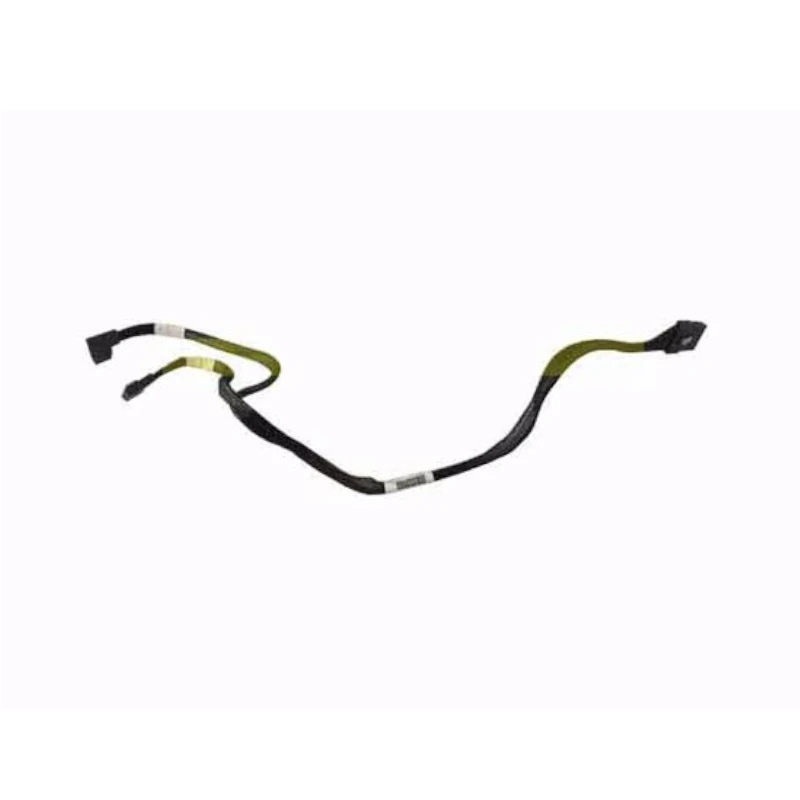
| Part Number: | 876505-001 |
|---|---|
| Manufacturer: | HPE |
| Servers Spare Parts: | Server Cable |
| Model: | StorageWorks SAN switch |
| Description: | Buy HPE 876505-001 ML350 G10 Power Extension Y-cable. Genuine part with fast worldwide shipping from Euroland IT Store UK. |
| Availability: | In Stock |
The HPE 876505-001 is an internal power extension Y-cable for the HPE ProLiant ML350 Gen10. A Y-cable takes power from one source connector and splits it into two outputs, so two internal components can be powered from a single header, or a power connection can be extended to reach a device further from the power source.
The ML350 Gen10 supports many internal options, including extra drive cages, media drives and expansion devices, and several of them need their own power feed. HPE supplies specific power cables and extensions for these options. Because internal power connectors vary in pin count and keying, please compare the label and connectors on your existing cable, or send us your configuration, before ordering. We will confirm the match.
Euroland IT Store offers the 876505-001 in New and Refurbished condition, subject to stock. Explore more spares at Euroland IT Store.
Every drive backplane, media drive and many expansion options in a server need a stable power supply. In the ML350 Gen10, power is distributed from the power supply backplane and system board to these components through dedicated cables. When you add a new cage or option, you may need an extra power connection that the existing cabling does not provide. A Y-cable or extension solves this without overloading or improvising.
Using HPE’s own power cable is important. Internal power connectors carry significant current, and incorrect wiring or a poor-quality cable can lead to overheating, intermittent faults or damage. HPE cables use the correct wire gauge, pin layout and keying for the ML350 Gen10.
Many organisations buy the ML350 Gen10 because it can grow with the business. A server might start with a single drive cage and later gain extra cages, an RDX or LTO drive, additional network cards or even a GPU. Each addition places new demands on the internal power layout. Power extensions and Y-cables are the parts that let those additions connect cleanly to the existing power distribution. Keeping a note of which power connectors are already in use, and which remain free, makes it far easier to plan the next upgrade and order the right cables first time. It also helps support teams understand the build if they are called in to diagnose a fault, because the power layout follows HPE’s documented design rather than a set of improvised adapters.
A New cable is unused and suits new builds or organisations requiring new parts. A Refurbished cable has been used before and prepared for resale, offering a cost-effective repair option. It may show light marks from earlier handling.
Please check the warranty and condition details shown on this page before ordering.
| Specification | Details |
|---|---|
| Manufacturer | HPE / Hewlett Packard Enterprise |
| Part Number | 876505-001 |
| Description | ML350 Gen10 power extension Y-cable |
| Cable Type | Internal power cable |
| Design | Y-split extension (one input, two outputs) |
| Server | HPE ProLiant ML350 Gen10 |
| Connector Types and Length | Please compare with your existing cable or ask us to confirm |
| Condition | New or Refurbished, subject to stock |
If you are expanding storage, you may also need data cables alongside power. Our ML350 Gen10 range includes the HPE 876496-001 dual Mini SAS cable, the HPE 877578-B21 embedded SATA cable kit and the HPE 874570-B21 RDX/LTO media drive support kit. For information on server power in general, read our power supply guide.
Adding cages and drives increases the server’s power draw. Before expanding, check that your power supplies have enough capacity, particularly if you also run high-power processors or expansion cards. HPE’s Power Advisor tool can estimate total consumption for a given configuration. Running a server close to its power limit can reduce redundancy if one power supply fails.
Always shut down the server and disconnect every power cord before working on internal power cabling, as power supplies can remain live while plugged in. Remove the side access panel, connect the Y-cable to the source header and the two target components, and make sure each connector clicks into place. Route the cable away from fans and sharp edges, then close the server and check in iLO that no power warnings are reported.
We supply HPE server components across the UK, with free shipping on orders over £100 plus VAT to UK mainland addresses. See our shipping page, or contact us for help identifying the right power cable.
It is an internal power extension Y-cable for the HPE ProLiant ML350 Gen10, used to split or extend a power connection to internal components.
It is not recommended. Server power connectors carry significant current, and HPE cables use the correct wiring and keying for safe operation.
Compare the connectors and label on your existing cable. Send us the details and we will confirm.
Yes. Make sure your power supplies have enough capacity for the extra load, especially if you rely on redundant power.
Yes. Orders over £100 plus VAT qualify for free shipping to UK mainland addresses.
You must be logged in to post a review.


Reviews
There are no reviews yet.