
Basket (0)
Close

Global leader in new, refurbished, compatible & discontinued multivendor IT-Hardware, spares and print supplies.
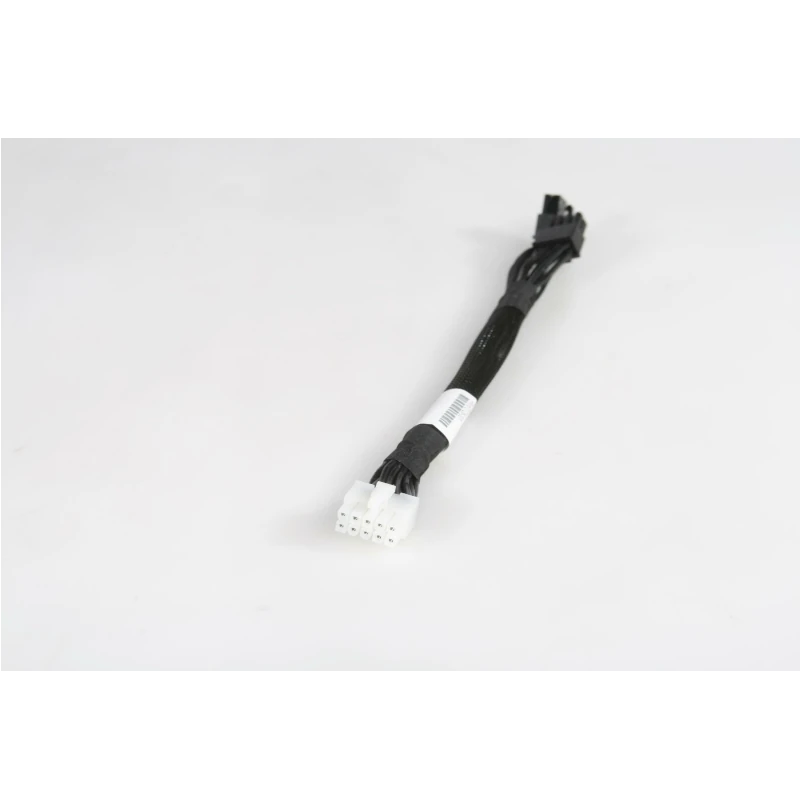
| Part Number: | 875089-001 |
|---|---|
| Manufacturer: | HPE |
| Servers Spare Parts: | Server Cable |
| Model: | DL380 G10 |
| Description: | Buy HPE 875089-001 DL380G10 SAS Cable Drive BackPlane to System Board. Genuine part with fast worldwide shipping from Euroland IT Store UK. |
| Availability: | In Stock |
If the front drives in an HPE ProLiant DL380 Gen10 are meant to run from the embedded controller but the server reports no drives, a missing backplane cable is often the reason. The HPE 875089-001 is the cable that connects the drive backplane to the system board in this configuration.
This part number is widely listed together with 869830-001 for the same DL380 Gen10 cable. Reseller specifications describe it as roughly 85cm long, with a right-angle SFF-8087 Mini SAS connector, a straight SFF-8087 connector and additional SATA and SATA power leads. Our listing names it the DL380 Gen10 SAS cable, drive backplane to system board.
Euroland IT Store offers the 875089-001 in New and Refurbished condition, subject to stock. Browse all HPE parts in our catalogue.
The Smart Array S100i is built into every DL380 Gen10. It is a software RAID controller that uses the server’s processors for RAID calculations and supports SATA drives. It can be a sensible choice when:
For SAS drives, larger arrays or write-intensive workloads, a hardware Smart Array controller is usually the better option. Operating system support also varies, so check HPE’s support information for the S100i with your chosen operating system or hypervisor before relying on it.
After fitting the cable, the S100i must be enabled in the server’s system utilities. On many Gen10 servers, the embedded SATA configuration is set to AHCI by default, and it needs to be switched to Smart Array SW RAID mode to create arrays. Once enabled, you can configure RAID through Intelligent Provisioning or HPE Smart Storage Administrator. If the drives still do not appear, check that the cable is seated at both ends.
Remember that switching between AHCI and RAID modes can affect any existing installation. If the server already has an operating system installed in AHCI mode, changing the setting may stop it from booting until the correct drivers are in place. Plan the mode before installing the operating system, and keep a current backup before changing storage settings on a live server.
HPE parts often carry two numbers. One is printed on the cable during manufacture, and the other is used by HPE service when supplying replacements. For this cable, 875089-001 and 869830-001 are the two numbers you are most likely to see. If either appears on your cable label, you are looking at the right family. The related listing is the HPE 869830-001 DL380 G10 SAS cable.
A New 875089-001 is unused and suits new builds or organisations that require new spares. A Refurbished 875089-001 has been used before and prepared for resale. It may show light marks but offers good value, particularly when restoring a server that arrived without its embedded controller cabling.
Please read the warranty and condition details for your chosen option on this page.
| Specification | Details |
|---|---|
| Manufacturer | HPE / Hewlett Packard Enterprise |
| Part Number | 875089-001 |
| Related Number | 869830-001 |
| Cable Type | Internal SAS/SATA storage cable |
| Connectors | SFF-8087 right-angle and straight, plus SATA and SATA power leads (reseller specification) |
| Length | Approximately 85cm (reseller specification) |
| Connection | Drive backplane to system board |
| Server | HPE ProLiant DL380 Gen10 |
| Condition | New or Refurbished, subject to stock |
The 875089-001 is listed for the HPE ProLiant DL380 Gen10. It should not be assumed to fit the DL380 Gen9 or Gen10 Plus, which have different board layouts. If your server uses a Smart Array controller rather than the S100i, it will normally use different cables, such as the HPE 839760-001 AROC port 2 cable.
Because the S100i supports SATA drives, SATA SSDs are a popular choice for boot and general workloads. Options in our range include the HPE P41525-001 3.84TB SATA SSD. You can see more in our server SSD category.
Turn off and unplug the server. Remove the access panel and air baffle. Connect the right-angle end at the backplane and route the cable to the system board, then connect the straight end and any SATA leads required. Replace the air baffle and access panel, start the server, enable the S100i in system utilities and confirm the drives are visible.
We supply HPE server parts across the UK, with free shipping on orders over £100 plus VAT to UK mainland addresses. Details are on our shipping and delivery page.
You need it when the front drives of a DL380 Gen10 are run from the embedded S100i controller on the system board.
The S100i may need to be enabled in system utilities, as embedded SATA is often set to AHCI mode by default. Also check that both ends of the cable are fully seated.
They are widely listed together for the same DL380 Gen10 backplane to system board cable. Check your existing label to confirm.
No. The S100i supports SATA drives. SAS drives need a hardware Smart Array controller.
Yes. We deliver throughout the UK, with free shipping on orders over £100 plus VAT to UK mainland addresses.
You must be logged in to post a review.

Reviews
There are no reviews yet.